
Projected Spend estimates where your spending will finish at the end of the month. The new Budget Health panel on iPhone shows that forecast beside Left to spend, with a daily spending tile above them to help you stay on track—or get back on track.
You can open the same breakdown from Home or Budget. The panel appears when you have a budget; build one first if you haven’t added one yet.
What’s the difference between the three numbers?
- Left to spend: your monthly budget minus spending counted so far.
- Projected Spend: spending so far plus likely upcoming recurring costs and an estimate of the flexible spending still to come.
- Your daily spending limit: an amount to aim for each remaining day after setting aside the upcoming recurring costs in your forecast. The details call this your Daily Spending Target.
This helps you see an expensive month coming before the budget is used up. A positive amount left today doesn’t necessarily mean you’re on course to finish within budget.
How is Projected Spend calculated?
For the current month, Vylo adds three parts:
- Spending so far. Expenses counted in the selected month. Income, internal transfers, and excluded spending aren’t treated as expenses. Pending transactions don’t count as posted spending in the current iPhone app.
- Upcoming Recurring Costs. Likely repeat expenses that haven’t already been counted for the month. Vylo looks for the same merchant and spending group in at least two recent months, with similar amounts. It uses the typical amount and payment day to estimate what’s still ahead. Fixed, Non-monthly, and Digital subscriptions are checked for these costs.
- Flexible Spend Pace. An estimate of your remaining flexible spending, based on average daily spending. When recent history is available, Vylo blends 72% of this month’s daily pace with 28% of the daily average from up to three earlier months. Without that history, it uses this month’s pace. It multiplies that daily estimate by the days remaining. Fixed, Non-monthly, and Digital subscriptions are excluded from this part so those costs aren’t forecast twice.
Projected Spend = spending so far + included upcoming recurring costs + remaining flexible spending estimate.
These are estimates drawn from the information Vylo has. A recurring payment may change, a bank may be delayed, or an unusual purchase may affect your pace. You can open the breakdown to see the amounts behind the total.
How is the daily spending limit calculated?
Vylo subtracts spending so far and included upcoming recurring costs from your monthly budget. It then divides what remains by the days left after today, rounding down to whole dollars.
Daily limit = (monthly budget − spending so far − included upcoming recurring costs) ÷ remaining days.
The flexible spending estimate is not subtracted again. The daily limit tells you what you can aim to spend; the flexible pace estimates what you might spend if your current pattern continues.
A worked example
These are demo figures, in your selected currency:
| Part of the calculation | Amount |
|---|---|
| Monthly budget | $3,150 |
| Spending so far | $2,200 |
| Upcoming recurring costs | $300 |
| Available after those costs | $650 |
| Days remaining after today | 9 |
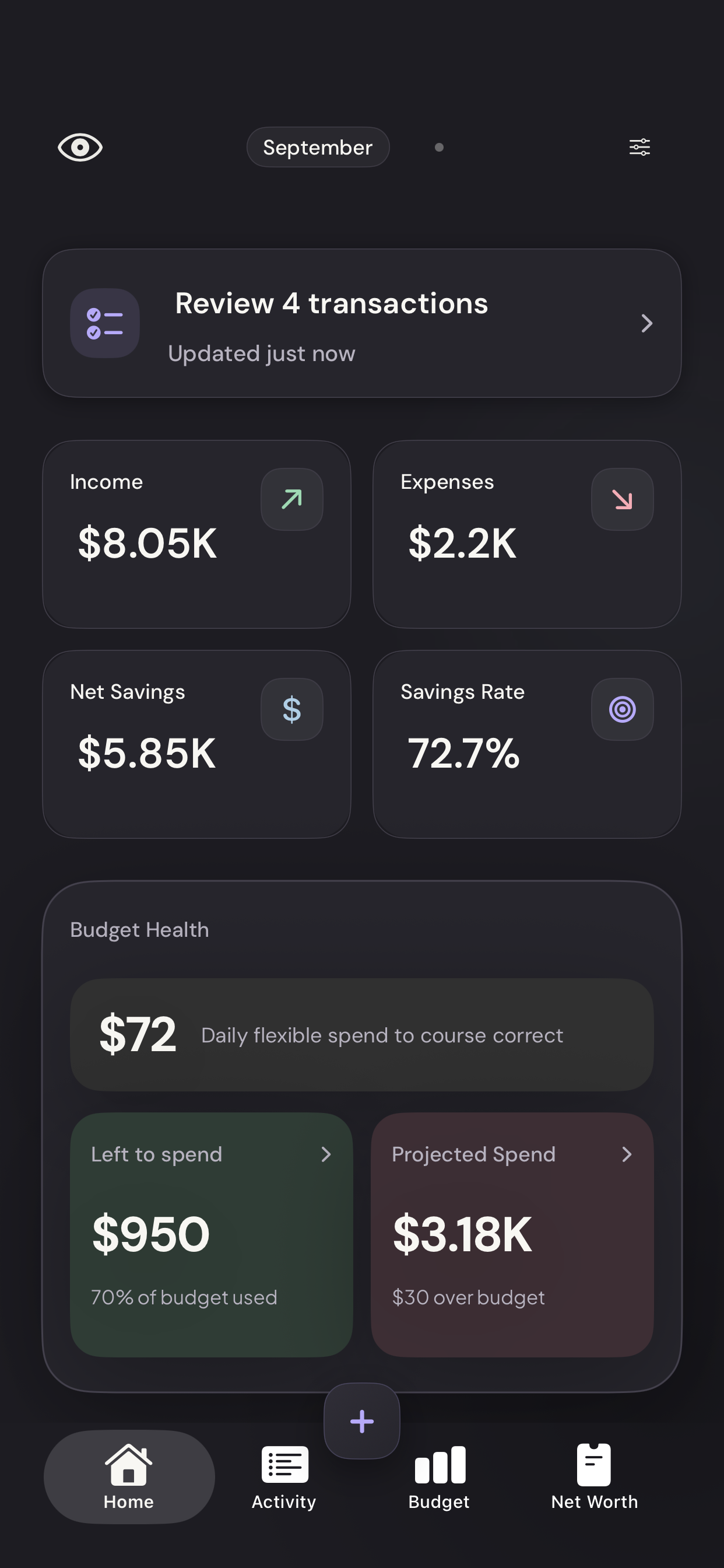
| Daily spending limit, rounded down | $72 |
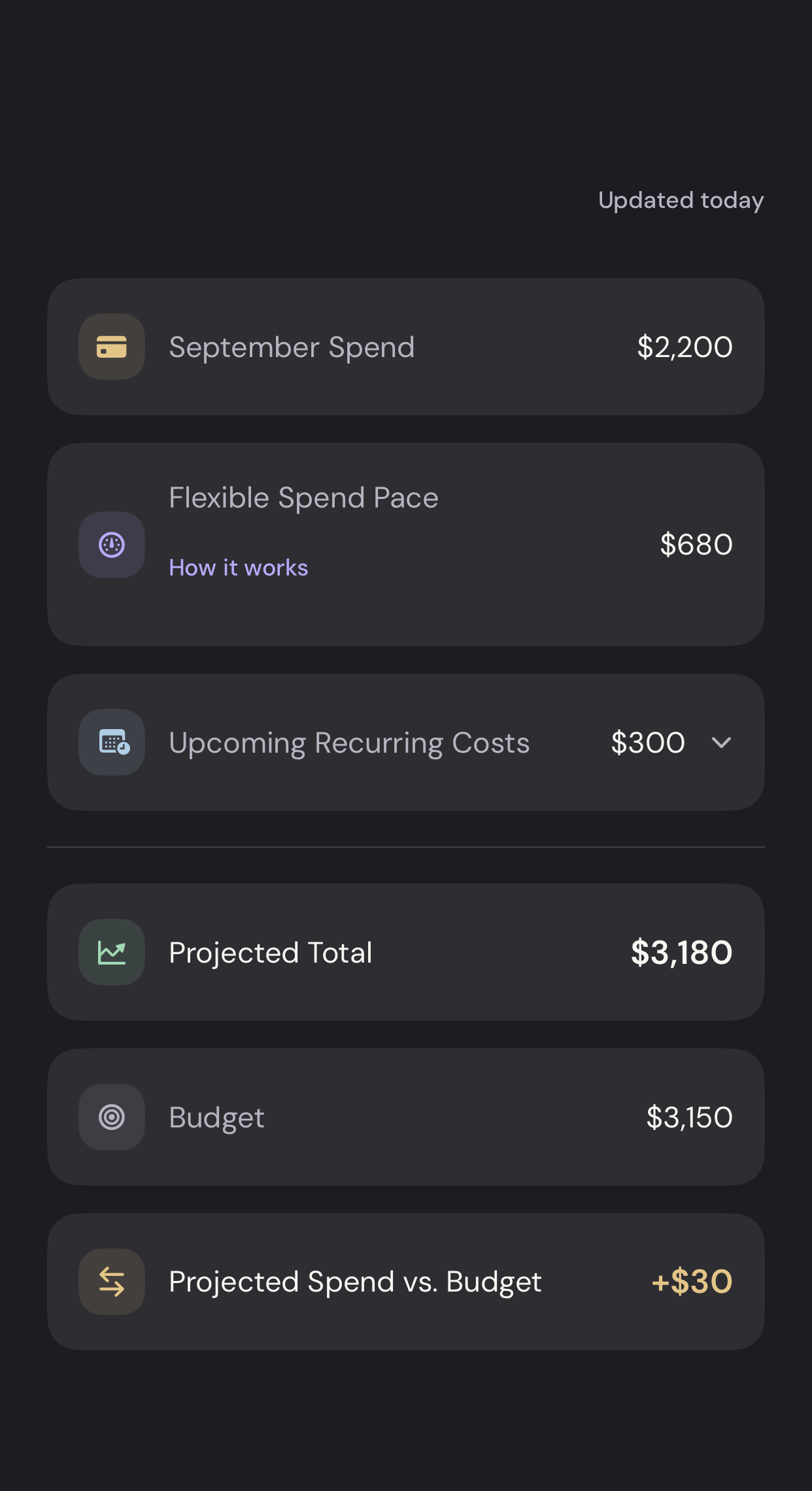
If the remaining flexible spending estimate is $680, your month-end forecast is $3,180: $2,200 + $300 + $680. That’s $30 over budget. Aiming for the daily limit gives you a way to adjust for the rest of the month.
What changes when I ignore an upcoming cost?
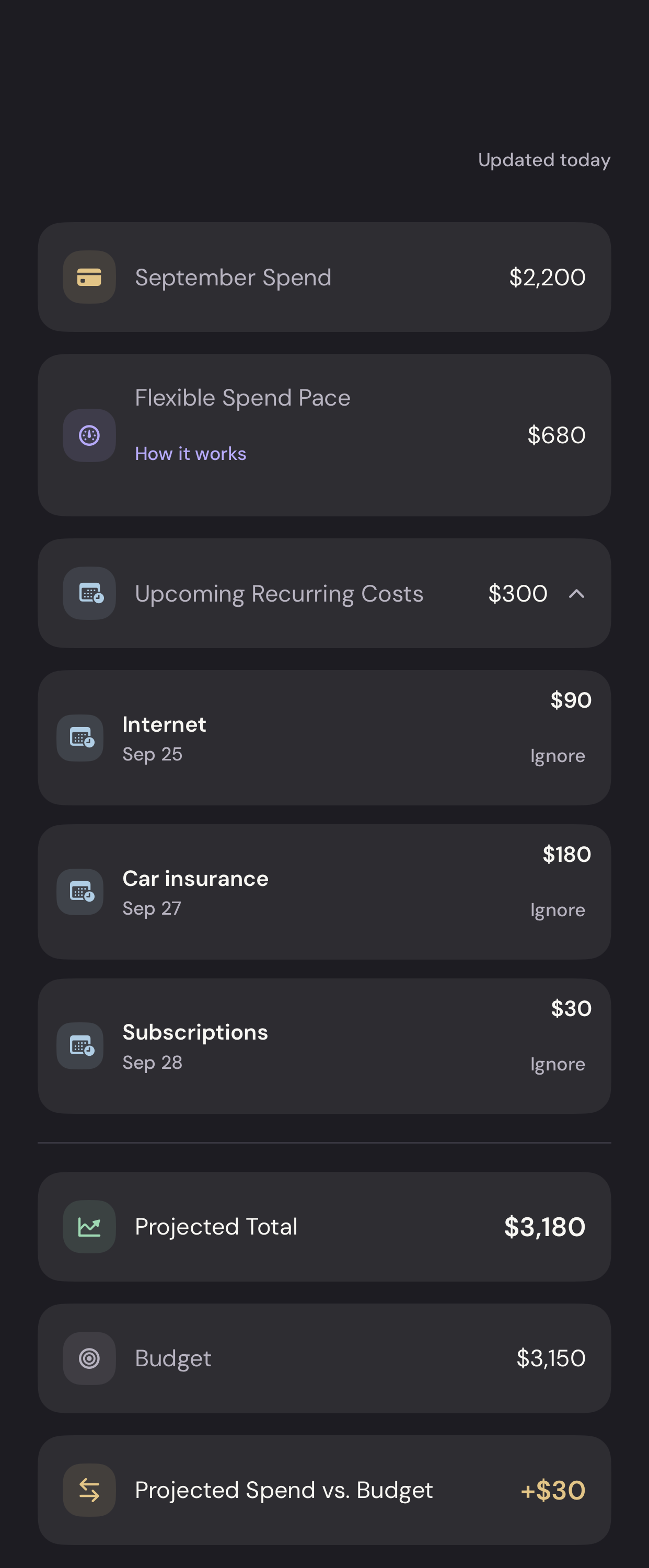
Open Projected Spend, expand Upcoming Recurring Costs, and choose Ignore beside a cost you don’t expect to pay. Vylo removes that cost from the forecast and recalculates the total, the budget comparison, and the daily limit.
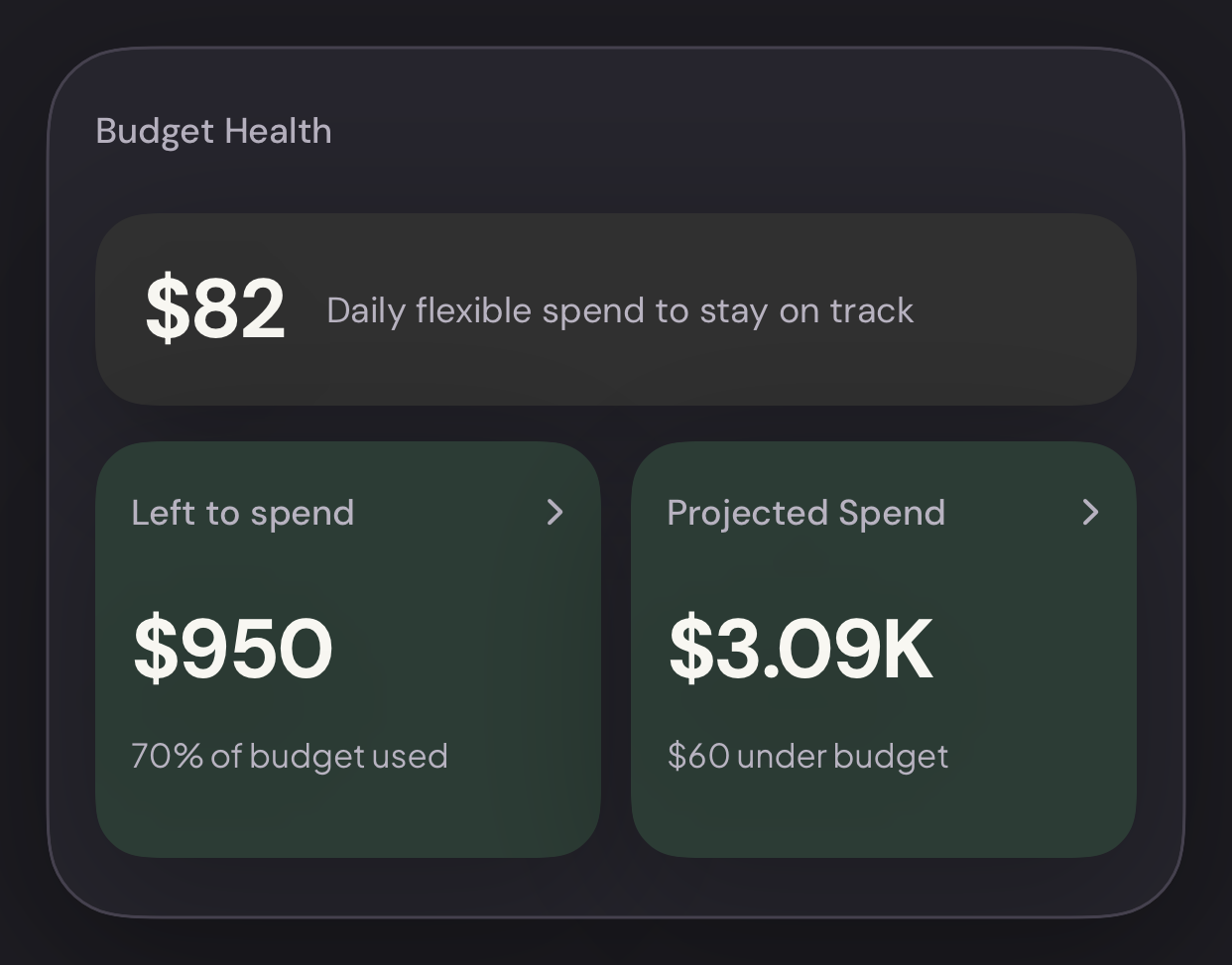
In the example above, ignoring a $90 cost reduces upcoming costs to $210. Projected Spend becomes $3,090, or $60 under budget, and the daily limit becomes $82: ($3,150 − $2,200 − $210) ÷ 9, rounded down.
Ignoring a cost does not cancel a subscription, delete a transaction, change a category, or alter your budget. If the payment later posts, it still counts as actual spending.
Open View ignored to restore a manually ignored cost. The forecast will include it again. Costs already excluded by a saved merchant rule or matching excluded transaction can’t be restored here; change the underlying exclusion if it is incorrect.
Manual choices apply to that recurring series across months and are saved for the household on this device. They aren’t synced across devices, so check them again if you change devices or reinstall the app.
Why does the daily limit change or disappear?
The amount can change when transactions arrive, your budget changes, upcoming costs are ignored or restored, or the number of remaining days changes.
The Home and Budget panels don’t show the daily tile when no days remain or there isn’t at least $1 available per day. Past months show recorded spending without a remaining-spend forecast. Future-month calculations use the days in that month and recent spending history.
Is this money I can safely spend from my account?
The daily limit is budget guidance, not your bank balance or a restriction on your cards. It doesn’t move money or prevent purchases. Your balance also depends on income timing, savings, debt payments, and other account movements.
If a figure looks wrong, check the selected month, transaction categories, upcoming costs, and bank updates. Contact hi@myvylo.com if you still need help.
On iPhone
These screens use demo data. Your forecast and daily spending limit update with your own budget, spending, and upcoming costs.
Find Budget Health on Home
The daily spending tile gives you an amount to aim for each remaining day. Below it, the two tiles show what is left today and where spending is projected to finish.
Vylo for iPhone · Demo dataTap to enlarge Open the forecast
Tap the Projected Spend tile on Home or Budget. The breakdown shows spending so far, flexible spend pace, upcoming recurring costs, and the comparison with your budget.
Vylo for iPhone · Demo dataTap to enlarge Check upcoming recurring costs
Expand Upcoming Recurring Costs. If you do not expect a listed payment, tap Ignore beside it. In this example, we ignore the $90 Internet cost. This changes the forecast; it does not cancel the service.
Vylo for iPhone · Demo dataTap to enlarge See your updated daily limit
Close the breakdown to return to Home. The forecast is now $3,090, or $60 under budget, and the daily limit is $82. Left to spend stays at $950 because no actual spending changed.
Vylo for iPhone · Demo dataTap to enlarge